Free Electronic Signature App
Signo — Sign Documents on Your iPhone
Signo is a free iOS app that lets you sign any PDF document instantly. Draw your signature, place it on the page, and share — no printer, scanner, or account needed. Works completely offline.
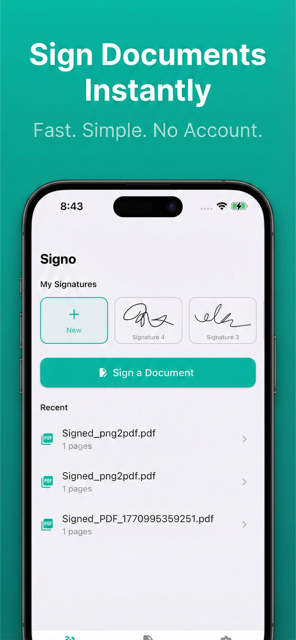
See It in Action
From signature creation to signed document — seamless and instant.
The Simplest Way to Sign
No fax machines, no printers, no scanning. Just your iPhone and your finger.
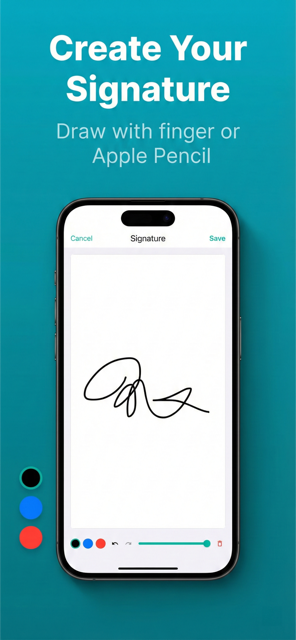
Draw Your Signature
Use your finger or Apple Pencil to create a natural-looking signature. Adjust thickness and color to match your style.
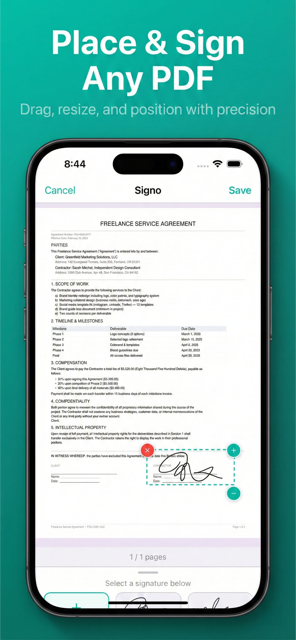
Sign Any PDF
Import PDFs from Files, email, or other apps. Place your signature anywhere on the document with drag and pinch to resize.
Multiple Signatures
Create and save different signatures for personal and business use. Switch between them instantly.
100% Private
Everything stays on your device. No uploads, no cloud storage, no account. Your documents remain yours.
Works Offline
No internet needed. Sign documents anywhere — on a plane, in the field, or without Wi-Fi.
Share Anywhere
Export signed PDFs via email, AirDrop, Messages, or save to Files. One tap to send your signed document.
Three Steps to a Signed Document
Import PDF
Open a PDF from Files, email, or any app on your device.
Draw & Place
Create your signature and drag it to the right spot on the page.
Share
Export via email, AirDrop, Messages, or save to Files.
Looking for a Free E-Signature App?
Signo gives you everything you need to sign documents — without the subscription.
| Feature | Signo | Markup (iOS) | DocuSign |
|---|---|---|---|
| Price | Free | Free | $10/mo |
| Works Offline | Yes | Yes | No |
| Draw Signature | Yes | Yes | Yes |
| Save Signatures | Multiple | No | Yes |
| Sign PDFs | Yes | Limited | Yes |
| Account Required | No | No | Yes |
| Privacy | 100% on-device | On-device | Cloud upload |
Frequently Asked Questions
- Is Signo free?
- Yes, Signo is completely free to download and use. There are no subscriptions, in-app purchases, or hidden fees. The app is supported by non-intrusive ads.
- Does Signo work offline?
- Yes, Signo works entirely offline. Your documents and signatures never leave your device. No internet connection is needed to sign, save, or share.
- How do I sign a PDF with Signo?
- Open Signo, import a PDF from Files or your photo library, draw or type your signature, then drag it to the right position. Tap done to save your signed document.
- Can I save multiple signatures?
- Yes, Signo lets you create and save multiple signatures. Switch between them easily when signing different documents — no need to redraw each time.
- What file formats does Signo support?
- Signo works with PDF files. You can import PDFs from the Files app, email attachments, or other apps. Signed documents are exported as PDF.
- Is my data safe with Signo?
- Absolutely. Signo processes everything locally on your device. No documents are uploaded to any server. No account or sign-up is required.
- What devices does Signo support?
- Signo is available for iPhone and iPad running iOS 16 or later. It supports English, Korean, Japanese, and Spanish.
Ready to Go Paperless?
Download Signo for free. No account, no subscription, no printer needed.


